
5 Food-Fotografie-Fehler, die Ihre Online-Bestellungen ruinieren (mit schnellen Lösungen)
 Ali Tanis7 Min. Lesezeit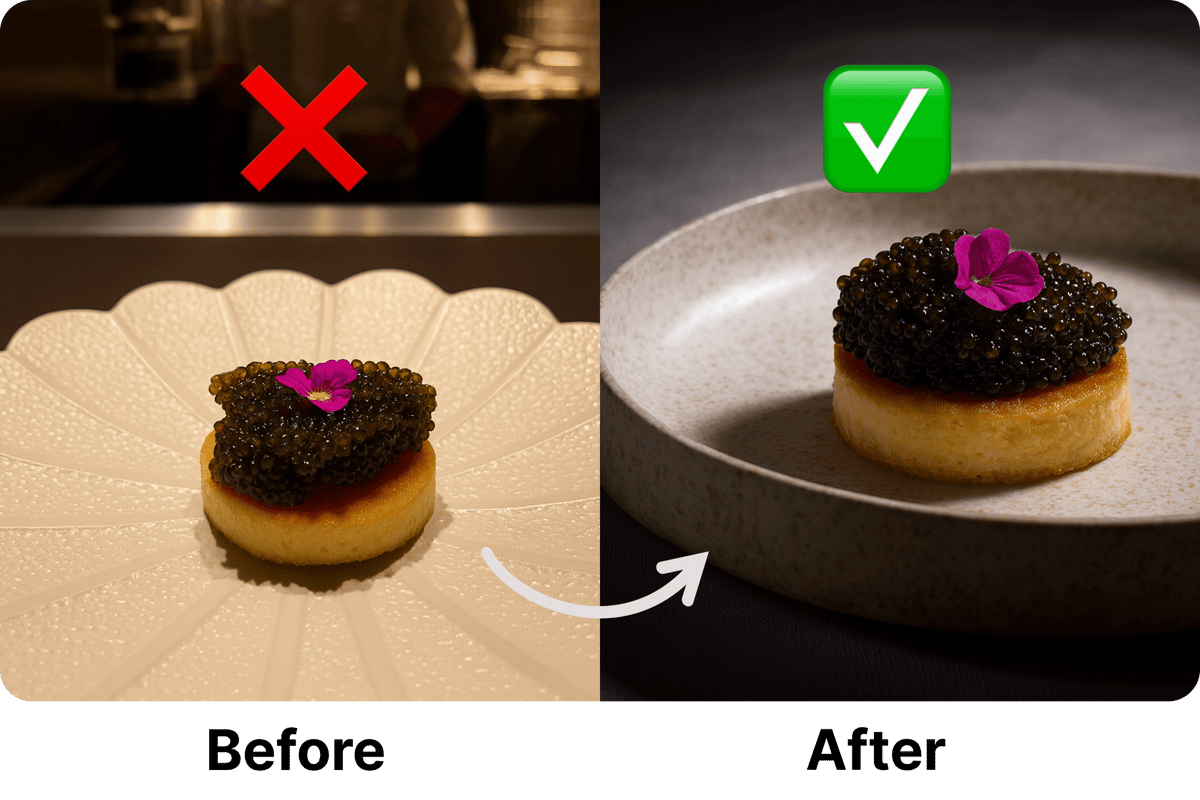
Letzte Woche zeigte mir ein Restaurantbesitzer seine UberEats- und DoorDash-Statistiken. „Wir machen unglaublich gutes Essen", sagte er, „aber unsere Online-Bestellungen gehen ständig zurück." Ein Blick auf seine Menüfotos genügte, und ich wusste sofort, warum seine Umsätze nicht stiegen.
Sein perfekt knuspriges Brathähnchen sah matschig aus. Seine großzügigen Portionen wirkten winzig. Seine leuchtenden Salate schienen welk. Die Fotos ruinierten sein Geschäft, bevor die Kunden überhaupt die Chance hatten, das Essen zu probieren.
Kommt dir das bekannt vor? Damit bist du nicht allein. Die meisten Restaurants machen dieselben Food-Fotografie-Fehler, die hungrige Kunden direkt zur Konkurrenz treiben. Die gute Nachricht? Jede Korrektur dauert nur wenige Minuten.
Watch: Transform Your Delivery Photos in About 2 Minutes
Sieh, wie Restaurants ihre Fotos in Liefer-Apps transformieren und ihre Bestellungen mit KI-gestützter Fotografie um 30 % steigern
Warum deine Menüfotos heute wichtiger sind denn je
Stell dir vor: Es ist 19 Uhr. Ein potenzieller Kunde scrollt durch UberEats, DoorDash oder Lieferando, der Magen knurrt, die Kreditkarte liegt bereit. Dutzende Optionen stehen zur Wahl. Was bringt ihn dazu, bei deinem Restaurant zu bestellen und deinen Umsatz zu steigern?
Deine Fotos. Sonst nichts.
Sie können dein frisch gebackenes Brot nicht riechen. Sie können deine Geheimsoße nicht probieren. Sie können deinen freundlichen Service nicht erleben. Alles, was sie haben, sind diese kleinen Rechtecke auf ihrem Bildschirm. Und wenn diese Rechtecke ihnen nicht das Wasser im Mund zusammenlaufen lassen, sind sie weg.
Deine Menüfotos sind deine einzige Chance für einen ersten Eindruck. Sorgen wir also dafür, dass sie ihren Job erledigen.
Fehler Nr. 1: Dein Essen versteckt sich im Schatten
Ich habe einmal den „Signature Schokoladen-Lavakuchen" eines Restaurants gesehen, der wie ein brauner Klumpen in einer Höhle aussah. Man konnte den flüssigen Kern nicht erkennen, den Puderzucker nicht sehen und nicht einmal erkennen, dass es ein Dessert war. Kein Wunder, dass ihn niemand bestellt hat.
Dunkle Fotos sind Bestellungskiller, die deinen Umsatz direkt schmälern. Wenn Kunden dein Essen nicht klar erkennen können, füllt ihr Gehirn die Lücken – und selten zu deinen Gunsten. Das saftige Steak wird zu „wahrscheinlich verkocht". Dein frischer Salat wird zu „wahrscheinlich welk". Du verlierst buchstäblich Geld durch Schatten.
Die einfache Lösung:
Move your photo setup next to a window. Seriously, that's it. Natural light makes food look fresh and appetizing. No expensive equipment needed.Falls du abends fotografieren musst, schalte jedes Licht in deiner Küche ein. Nutze ein weißes Stück Pappe, um Licht auf die dunkle Seite deines Gerichts zurückzuwerfen. Deine Handykamera erledigt den Rest. (Erfahre mehr über iPhone-Techniken zum Essen fotografieren, die auf Lieferservice spezialisierte Restaurants nutzen.)
Schnelltest: Wenn du die Augen zusammenkneifen musst, um Details auf deinem Foto zu erkennen, ist es zu dunkel. Deine Kunden werden nicht die Augen zusammenkneifen – sie werden weiterscrollen.
Fehler Nr. 2: Das Problem mit dem falschen Hintergrund
Ein Sushi-Restaurant rief mich in Panik an. Ihr Premium-Thunfisch verkaufte sich auf UberEats nicht, obwohl er ihr bestes Gericht war. Ein Blick auf das Foto, und ich verstand – das Sushi wurde in der geschäftigen Küche fotografiert, mit dem ganzen Restaurantchaos im Hintergrund.
Folgendes signalisieren Küchenhintergründe den Kunden: „Das ist nur eine weitere schnelle Mahlzeit." Professionelle Hintergründe sagen: „Das ist ein Esserlebnis, das sich zu bestellen lohnt."
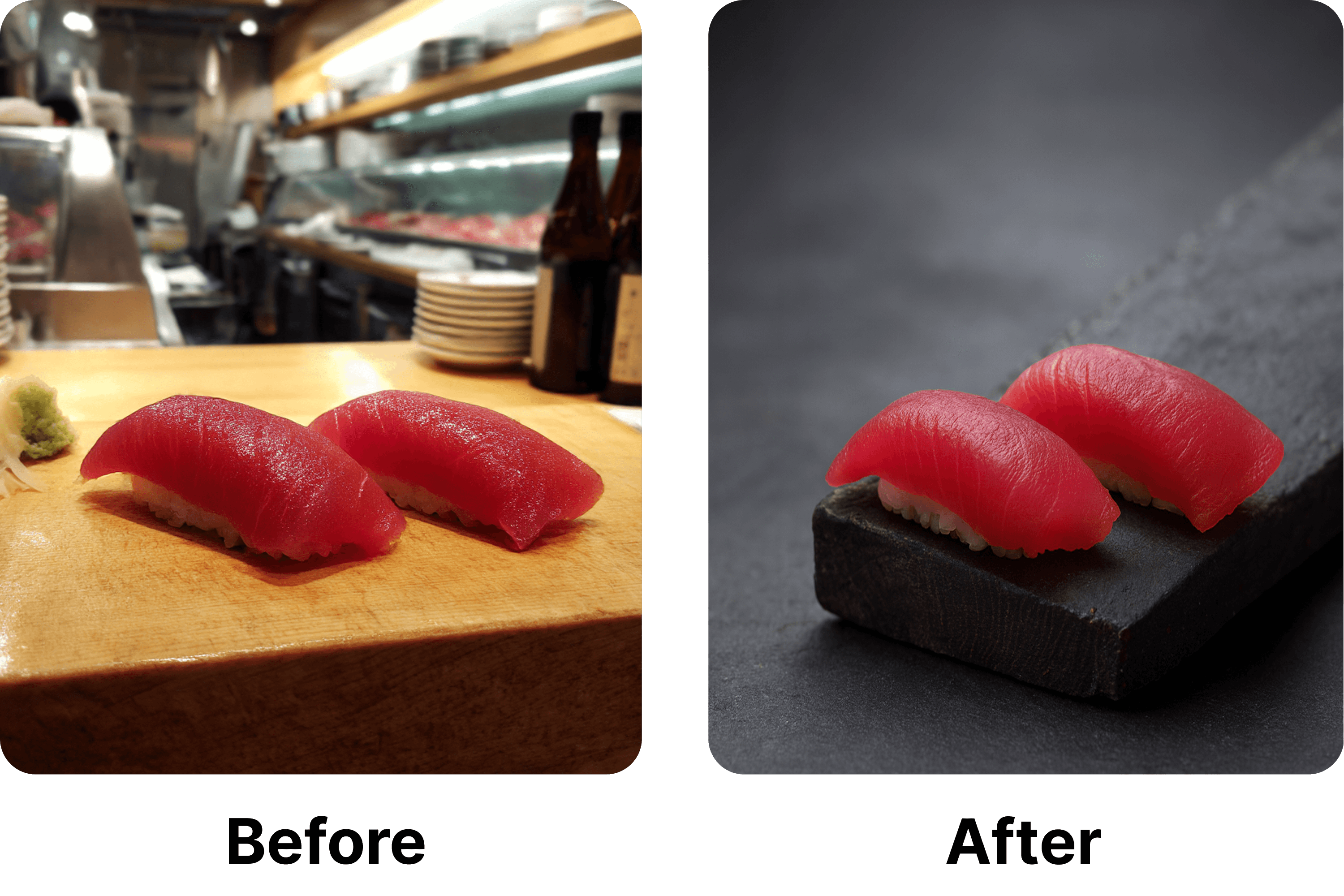
Dasselbe Premium-Thunfisch-Sushi, eine andere Geschichte. Links: Der Food-Fotografie-Hintergrund in der Küche lenkt vom Essen ab. Rechts: Schwarzer Schiefer macht das Sushi zum Star. Erstellt mit FoodShot AI
Die einfache Hintergrund-Lösung:
Find a clean surface – a white table, black slate, or even a wooden board. Place your dish there instead of the prep area. This one change can transform your photo from "kitchen snapshot" to "menu-worthy."Für beste Ergebnisse verwende denselben Hintergrund für alle deine Fotos. Konsistenz schafft Vertrauen. Wenn Kunden einen einheitlichen Stil sehen, wissen sie, dass du auf Details achtest.
Profi-Tipp für den Hintergrund: Eine schwarze Schaumstoffplatte für 10 € aus dem Bastelladen kann zu deinem Markenzeichen-Hintergrund werden. Sie lässt Farben strahlen und sieht in jeder Aufnahme professionell aus.
Fehler Nr. 3: Deine großzügigen Portionen wirken winzig
Ein Burgerladen beschwerte sich, dass die Konkurrenz ihnen Kunden „klaut" – mit kleineren, teureren Burgern. Dann sah ich ihre Fotos. Ihre riesigen 250-Gramm-Burger wurden direkt von oben fotografiert und sahen dadurch wie Mini-Burger aus. Die Konkurrenz hingegen fotografierte von der Seite, sodass normale Burger riesig wirkten.
Der Kamerawinkel ist alles. Dasselbe Gericht kann wie ein Festmahl oder wie eine Vorspeise aussehen – je nachdem, wohin du deine Kamera richtest.
Der magische Winkel:
Stand at the edge of the table and tilt your phone at roughly 45 degrees. This angle shows both the top of your food (so customers see what they're getting) and the front (so they see how tall and generous it is).Denke daran wie an ein erstes Date – du willst deine beste Seite zeigen. Bei Burgern heißt das, die saftigen Schichten zu sehen. Bei Pasta heißt es, den Berg aus Nudeln zu zeigen. Bei Salaten heißt es, all die versteckten Zutaten sichtbar zu machen. Erfahre mehr über Winkel und Techniken der Food Fotografie, die Profis verwenden.
Der Instagram-Test: Wenn dein Essen auf Instagram keine Likes bekommen würde, bekommt es auch keine Bestellungen auf UberEats oder DoorDash. Dieselbe Psychologie, andere Plattform – beides kann deinen Umsatz steigern, wenn es richtig gemacht wird.
Fehler Nr. 4: Der „Leucht-Essen"-Effekt
Wir haben es alle schon gesehen – das gehobene Restaurant, in dem der orangefarbene Kaviar nuklear leuchtend aussieht. Oder das Bistro, in dem der Lachsrogen wie Neon glüht. Diese Fotos schreien nur eines: „Das ist kein echtes Essen."
Übermäßiges Bearbeiten ist Gift für das Vertrauen. Wenn Kunden unnatürliche Farben sehen, gehen sie davon aus, dass du etwas verbirgst. Vielleicht sieht das echte Essen gar nicht so gut aus? Vielleicht ist es nicht frisch? Schon der kleinste Zweifel reicht, damit sie woanders bestellen.
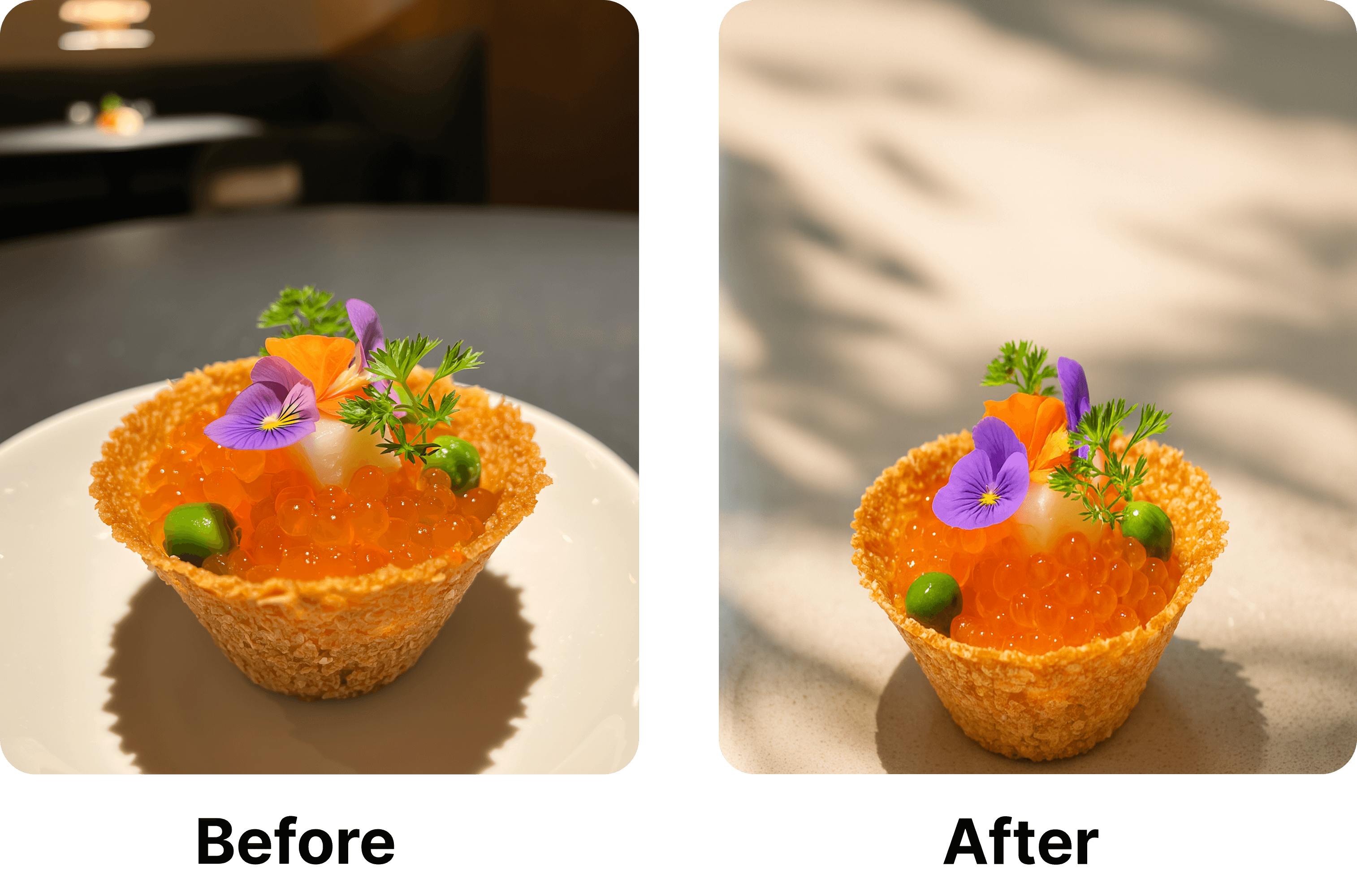
Natürliche Farben verkaufen. Links: Dunkler, übersättigter orangefarbener Kaviar sieht künstlich aus. Rechts: Helle, natürliche Beleuchtung zeigt Premium-Qualität. Optimiert mit FoodShot AI
Halte es natürlich:
Your food already has beautiful, natural colors. You just need to bring them out, not paint over them.Meine einfache Regel: Bearbeite dein Foto, bis es so aussieht, wie du es mit eigenen Augen siehst – und dann hör auf. Helle es gerade so weit auf, dass alle Details erkennbar sind. Füge einen Hauch Wärme hinzu, damit gekochtes Essen einladend wirkt. Das war's.
Der Oma-Test: Würde deine Oma das als Essen erkennen? Wenn sie fragen würde „Was ist dieses leuchtende Ding?", bist du mit der Bearbeitung zu weit gegangen.
Fehler Nr. 5: Deine Speisekarte sieht aus wie von fünf verschiedenen Restaurants
Ich habe kürzlich einem Familienrestaurant geholfen, das seit 20 Jahren existiert. Ihre Menüfotos waren eine Zeitreise durch verschiedene Fotografie-Stile – manche von 2015 auf dunklem Holz, andere von 2020 auf Marmor, neue auf Weiß. Es sah aus, als hätten sie Fotos von verschiedenen Restaurants geklaut.
Kunden bemerken Inkonsistenz, auch wenn sie es nicht genau benennen können. Es macht sie unsicher. „Warum sieht das Pizza-Foto professionell aus, aber die Pasta wie mit einem Klapphandy fotografiert?" Diese Verwirrung erzeugt Zweifel. Zweifel kosten Bestellungen und verhindern, dass du deinen Umsatz auf Lieferservice-Plattformen steigerst.
Einmal einrichten, für immer nutzen:
Pick a background and stick with it. I recommend plain white – it never goes out of style and makes your food the star. Use the same spot in your restaurant for every photo. Shoot at the same time of day when possible.Es geht hier nicht um Perfektion. Es geht darum, professionell zu wirken. Wenn alle deine Fotos zusammenpassen, vertrauen Kunden darauf, dass du einen professionellen Betrieb führst.
Der Zwei-Pappen-Trick: Kauf dir zwei weiße Posterkartons im Ein-Euro-Laden. Einer kommt unter dein Gericht, der andere reflektiert das Licht. Nutze dieses Setup für jedes Foto. Sofortige Konsistenz für weniger als den Preis eines Latte.
Dein einfaches Sonntagsnachmittag-Projekt
Das wirst du dieses Wochenende machen. Es ist einfacher, als du denkst:
Finde zuerst die hellste Stelle in deinem Restaurant. Normalerweise in der Nähe eines Fensters. Stelle dort deine beiden weißen Tafeln auf. Das ist jetzt dein Fotostudio.
Hole als Nächstes deine fünf meistverkauften Gerichte heraus. Fang mit diesen an – sie bringen dir das meiste Geld ein und verdienen deshalb die besten Fotos. Wische jeden Teller sauber ab, richte alles schön an und fotografiere aus dem magischen 45-Grad-Winkel. Mach zehn Fotos von jedem Gericht. Eines davon wird perfekt sein.
Zum Bearbeiten nutze die integrierten Tools deines Handys oder probiere unseren KI-Fotoeditor aus. Helle das Foto auf, bis du alles klar erkennen kannst. Füge einen Hauch Wärme hinzu. Stopp. Fertig.
Lade diese neuen Fotos überall hoch – UberEats, DoorDash, Grubhub, deine Website, Social Media. Mach alles auf einmal, damit alles einheitlich aussieht, und beobachte, wie deine Bestellungen steigen. (Brauchst du Hilfe mit deiner Website? Schau dir unsere Preispläne für integrierte Lösungen an.)
Der gesamte Prozess? Maximal drei Stunden. Die Auswirkung auf deine Bestellungen? Du wirst innerhalb weniger Tage einen Umsatzanstieg von 20-30% feststellen. Restaurants, die diese Techniken anwenden, berichten von einer deutlichen Steigerung ihrer Lieferumsätze.
Wenn du schnellere Ergebnisse brauchst
Ich verstehe das. Du betreibst ein Restaurant, kein Fotostudio. Manchmal brauchst du professionelle Fotos schon gestern und nicht erst nächsten Sonntag.
That's where AI tools come in handy. They can fix your existing photos automatically – brightening, cropping, color-correcting, in a couple of minutes per photo. It's like having a food photographer in your pocket.
We built FoodShot AI for exactly this situation. Upload your current photos, and it fixes all five mistakes in about 2 minutes per photo. No learning curve, no equipment needed. But whether you use AI or do it manually, the important thing is to fix those photos and start increasing your delivery orders.
Das Fazit
Jedes Mal, wenn jemand UberEats oder DoorDash öffnet und an Ihrem Restaurant vorbeiscrollt, liegt es daran, dass Ihre Fotos keinen Appetit gemacht haben. Das ist ein verlorener Verkauf. Und das passiert dutzende Male jeden Tag und vernichtet Ihr Potenzial, mehr Bestellungen zu erhalten.
Gute Food-Fotografie hat nichts mit künstlerischem Ausdruck oder teurer Ausrüstung zu tun. Es geht darum, dass die Leute Ihr Essen essen wollen und Ihren Umsatz steigern. Diese fünf Korrekturen werden Ihre Bestellungen erhöhen und Ihnen helfen, auf den überfüllten Lieferplattformen zu bestehen.
Kurzer Realitätscheck:
Q: How much can better photos really increase my orders? A: Restaurants report 20-30% more orders within the first week. Some see up to 50% increase after updating all menu photos.F: Brauche ich einen professionellen Fotografen? A: Nein. 90 % der erfolgreichen Lieferrestaurants verwenden Handykameras. Die Technik ist wichtiger als die Ausrüstung.
F: Welche Plattformen sollte ich zuerst aktualisieren? A: Beginnen Sie mit Ihrer umsatzstärksten Plattform (in der Regel UberEats oder DoorDash) und aktualisieren Sie dann alle anderen innerhalb von 24 Stunden für ein einheitliches Erscheinungsbild.
Ihre Konkurrenten haben das bereits erkannt. Diejenigen mit appetitanregenden Fotos auf DoorDash und UberEats stehlen Ihnen die Kunden und steigern ihre Bestellungen um 30 % oder mehr.
Lassen Sie nicht zu, dass schlechte Fotos Ihre Essensbestellungen noch einen weiteren Tag ruinieren. Nehmen Sie Ihr Handy in die Hand, schnappen Sie sich die Plakatkartons und gönnen Sie Ihrer Speisekarte die Fotos, die sie verdient. Ihr Kontostand wird es Ihnen danken.
---
Want to fix your menu photos even faster? FoodShot AI ausprobieren and see the difference professional food photography makes for your online orders.