 Ali Tanis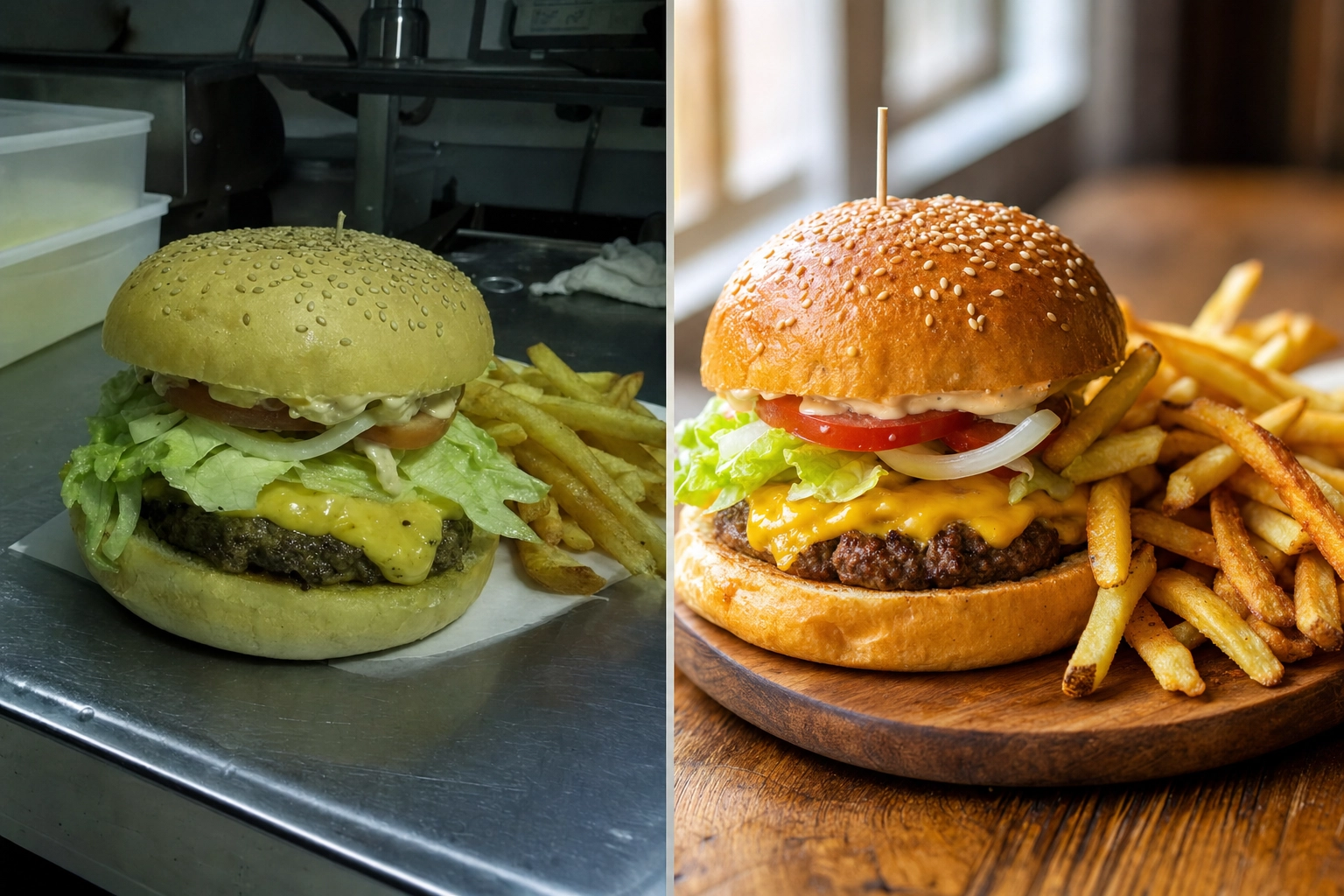
If you are weighing MenuPhotoAI against FoodShot, you are probably a restaurant or food brand owner who wants menu photos that sell — without booking a $600 photo shoot. Both tools take a phone snap of a real dish and turn it into a professional, menu-ready image in minutes. The real question is how far each one lets you go. MenuPhotoAI is a focused delivery-photo enhancer. FoodShot is a full food photography studio with 200+ styles, brand matching, and marketing tools built in. Here is the honest, side-by-side breakdown so you can pick the right tool the first time.
同じチーズバーガーのメニュー写真のビフォーアフター比較。くすんだスマホ写真と、明るくプロ品質にAI補正した仕上がりを並べたもの
Quick Summary: MenuPhotoAI is a solid, delivery-focused photo enhancer that starts at $39 per month. FoodShot is a broader AI food photography studio — 200+ styles, Builder Mode, brand matching, Poster Mode, and 2K output — starting at $15 per month. Both start from a photo of your real food rather than generating dishes from a text prompt.
MenuPhotoAI vs FoodShot:手っ取り早い結論
デリバリー写真を数枚きれいにしたいだけで、おまかせで頼めるオプションが好みなら、MenuPhotoAIは妥当な選択です。メニュー全体で一貫したブランドの見た目、より広い表現の幅、マーケティング用ポスター、そしてモバイルアプリを、より安い開始価格で使いたいなら、FoodShotの方が優れたAI料理写真エディターです。どちらも実際の料理を最高の状態に見せますが、違いは幅・コントロール・コストにあります。
MenuPhotoAIが得意なこと
評価すべき点はきちんと評価しましょう。MenuPhotoAIは、レストランのデリバリー写真を各プラットフォームの基準に適合させ、注文につなげるという明確な1つの目的を軸に作られています。創業者のPaoloとShivaniはヨーロッパで長年メニュー撮影に携わっており、機能にもその絞り込まれた方向性が表れています。
- デリバリープラットフォーム特化。 MenuPhotoAIはUber Eats、DoorDash、Grubhub、Deliverooの要件に強く寄せています。デリバリー用スタイルは、サムネイルが0.5秒で食欲をそそる必要がある小さなスマホ画面に合わせて調整されています。
- 写りの悪い写真の立て直し。 暗い・ぼやけている・スマホの照明で撮ったような写真こそ、真価を発揮する場面です。粗い写真をアップロードすれば、約30秒でよりクリアで明るく、プロらしい仕上がりが得られます。
- 無料の再編集。 最も特徴的なのが再編集の仕組みです。「もっと暖かみを」「コントラストを上げて」といった修正を伝えれば、追加料金なしで画像を調整してくれます。各画像には無料の再編集が付いています。
- スタイルマッチモード。 気に入った過去の仕上がりを選ぶと、同じ雰囲気を新しいアップロード写真にも適用でき、メニュー全体の統一感を保ちやすくなります。
- おまかせサービス。 ツールを一切操作したくないレストラン向けに、MenuPhotoAIはメールで写真を送るだけの加工サービスを提供しており、納期は24〜48時間です。
AI料理写真のあるべき姿について潔く正直な点も好感が持てます。つまり、架空の料理をでっち上げるのではなく、実際の料理を引き立てるという姿勢です。これはFoodShotも共有する価値観で、詳しくは後述します。
FoodShotが一歩リードする点
MenuPhotoAIは意図的に機能を絞っています。FoodShotは同じデリバリーの用途をカバーしたうえで、さらにその先まで対応します。これは、メニュー全体・ウェブサイト・SNSのフィードをまとめてスタイリングする段階になると効いてきます。ここでは、実際に結果を変える機能と、それが生み出すプロ品質の料理写真を紹介します。
8種類の異なる料理をそれぞれ違う雰囲気と背景でスタイリングしたグリッド。200種類を超える料理写真スタイルのライブラリを表現している
数十種類ではなく200種類以上のスタイル
最もはっきりした差は、選択肢の幅です。MenuPhotoAIはデリバリー用スタイルが約8種類、商品撮影用が18種類で、プリセットは合計およそ20種類あまり。FoodShotは厳選された200種類以上のスタイルを、デリバリー・メニュー・高級店のカテゴリーに整理して用意しています。この違いは単なる見栄えではありません。バーガー、抹茶ラテ、コースの一皿、クロワッサンのトレイは、それぞれ異なる照明・背景・雰囲気で初めて映えます。スタイルが多いほど、すべてを同じ数種類のプリセットに押し込むのではなく、料理ごとにぴったりの見た目を見つけられる可能性が高まります。カテゴリー全体の比較を見たい方は、おすすめのAI料理写真エディターのまとめで詳しく解説しています。
ビルダーモード:自分だけの構図を組み立てる
プリセットはあくまで出発点で、上限ではありません。FoodShotのビルダーモードなら、背景の素材・皿のスタイル・あなたの料理を組み合わせて1枚の構図を作り上げられます。パスタを暗いスレートの上でムーディーなサイド光で撮りたい、あるいはケーキを大理石のカウンターで明るく風通しのよい自然光の中に置きたい——そんなとき、固定のプリセットが近い仕上がりになることを祈るのではなく、自分で背景と照明を設定できます。MenuPhotoAIにはこうしたレイヤー構図の機能はなく、与えられた加工結果を受け取り、そこから再編集していく形になります。
マイスタイル:汎用プリセットではなく、あなたのブランドに合わせる
これは成長中のブランドが最も重視する機能です。マイスタイルでは、参考写真を数枚——自分のベストショットや、真似したい雰囲気の写真——アップロードすると、FoodShotがそのスタイルを新しいアップロード写真すべてに反映します。その結果得られるのがブランドの一貫性です。どの料理でも、どのプラットフォームでも、同じ暖かみ、同じ背景の表現、同じプロらしい質感が保たれます。MenuPhotoAIのスタイルマッチモードも過去の結果を再利用して近いことをしますが、マイスタイルは1枚の画像を複製するのではなく、ブランドのアイデンティティそのものを固定するために作られています。
複数バリエーションとポスターモード
1枚のアップロードで複数の選択肢が手に入ります。FoodShotは1枚の写真から料理の複数バリエーションを生成できるため、撮り直しなしでウェブサイトやデリバリーアプリ上で異なる見た目をA/Bテストできます。さらにポスターモードも搭載しており、仕上がった料理写真を、新メニューの告知や季節限定メニュー、SNSキャンペーン用のプロモ画像に変えるマーケティングテンプレートが使えます。MenuPhotoAIは加工した写真そのものに焦点を当てており、マーケティング用のレイアウトはあなた任せです。
デリバリーの先へ:商品撮影とマーケティング写真
パッケージ商品にとって、商品撮影は独自の難しさがあります。MenuPhotoAIには、シンプルな商品ショット向けの商品撮影スタイルが18種類含まれています。FoodShotも商品写真に対応しており——パッケージや小売リスティング、ウェブサイト用の商品画像を撮影するCPGブランド向けに——さらにそうした商品機能を、盛り付けたメニューや高級店の雰囲気と1つのライブラリにまとめています。カタログに小売商品の写真とレストランの料理が混在している場合、その両方をカバーする1つのツールがあれば、商品撮影とプロ品質のメニュー写真をあらゆるチャネルで一貫させられます。
無地のグラデーション背景に置かれたノーブランドのチリクリスプ瓶のスタジオ商品写真。CPGの商品撮影を表現している
2K Output and a 2× Upscale on Every Paid Plan
Resolution matters the moment you go beyond a delivery thumbnail — printed menus, in-store posters, and hero banners all need real pixels. Every FoodShot paid plan downloads at 2K, and the web studio's 2× upscale gives you a larger file when you need one for print. MenuPhotoAI reserves its Ultra-HD processing for its top tier. If print matters to you, compare the actual file sizes each tool gives you on the plan you would buy.
FoodShot vs MenuPhotoAI:機能と料金の比較
以下が直接比較で、料金は2026年7月時点で確認したものです。数値は変わることがあるので、購入前に各サイトで確認してください。
| 機能 | FoodShot | MenuPhotoAI |
|---|---|---|
| 開始価格 | 月額$15(年払いで月額$9) | 月額$39(初月$9.99) |
| 無料プラン | None on the web | テスト画像5枚+再編集10回、透かし入り |
| スタイルライブラリ | 200種類以上のスタイル(デリバリー、メニュー、高級店) | 約26種類(デリバリー8+商品18) |
| ビルダーモード(構図を自由に作成) | あり | なし |
| ブランドマッチング | マイスタイル(参考写真をアップロード) | スタイルマッチモード(過去の結果を再利用) |
| 1枚のアップロードから複数バリエーション | あり | 代わりに再編集 |
| ポスター・マーケティングテンプレート | ポスターモード | なし |
| 最大解像度 | 2K on all paid plans | 最上位プランのみUltra-HD |
| デリバリーアプリ最適化 | あり | あり(中核機能) |
| モバイルアプリ | iOSとAndroid | Web中心 |
| おまかせサービス | なし | あり(メール加工サービス) |
| APIアクセス | エンタープライズ | 営業に問い合わせ |
料金を比較:実際に支払う金額
The entry point is the headline. FoodShot's Starter plan is $15 per month, or about $9 per month billed yearly, and includes the full 200+ styles library, Builder Mode, Poster Mode, 2K output, and a commercial license. MenuPhotoAI's cheapest paid plan is $39 per month (discounted to $9.99 for the first month), giving you 25 images plus re-edits.
MenuPhotoAI offers a watermarked free tier so you can test before you pay; FoodShot has no free tier on the web, but its paid entry costs less than half as much and unlocks far more styles and features per dollar. If you process photos regularly, compare the real monthly value on the FoodShot pricing page rather than the sticker price alone. For a bigger-picture cost decision, our breakdown of AI vs hiring a food photographer shows why either tool beats a $500-2,000 shoot.
居心地のよい個人経営のカフェで、再生木材のカウンターに置かれたスタイリング済みのフラットホワイトとアーモンドクロワッサン。手頃な価格で撮れるプロ品質の料理写真を示している
正直な話:加工と捏造の違い
どのAI料理ツールにもつきまとう、もっともな懸念があります。偽の料理を作り出すのではないか、というものです。これは、そもそもあなたの写真がデリバリープラットフォームで許可されるかどうかに関わるため、はっきり答えておく価値があります。
Neither FoodShot nor MenuPhotoAI fabricates dishes. Both start from a photo of the real food you actually serve and improve it — better lighting, cleaner background, sharper texture, a more appetizing crop. FoodShot's approach is restyling: it starts from your burger, not a different one, but a style can change the plate, surface, props and light, so check each result against the real item before you publish it. That matters in practice. DoorDash, Uber Eats and other platforms expect menu images to represent the real item, some platforms, such as Deliveroo, do not accept AI-generated images at all, and photos that misrepresent food can be pulled or hurt customer trust.
Does FoodShot Work for Uber Eats and DoorDash?
Yes, on platforms whose rules allow edited photos. Delivery is a first-class use case, not an afterthought. FoodShot's Delivery style category is built for exactly this — clean, bright, high-contrast images that read instantly at thumbnail size on a crowded delivery app. You can prep the same dish for Uber Eats, DoorDash and Grubhub (Deliveroo does not accept AI-generated images), then reuse those same images on your website and social channels — the same photos working across delivery, web, and print — without another upload. See the dedicated delivery app photos workflow for the full delivery setup, and the food photography for restaurants guide for menu-wide styling. Platform photo standards evolve, so it is worth checking each platform's current merchant guidelines — for example DoorDash's photo requirements and Uber Eats menu photo guidance — before you publish a full menu.
レストランのパスカウンターに置かれた、クラフト紙のテイクアウト容器に入った鮮やかなサーモンポキボウル。Uber EatsやDoorDashのデリバリーサムネイルとして目を引くようにスタイリングされている
どちらを選ぶべき?
どちらか一方が「優れている」というものではありません——目の前の作業内容と、実際にどの機能を使うかによって変わります。2つの機能セットを自分の写真に照らし合わせてみれば、たいていはすぐに答えがはっきりします。
MenuPhotoAIが向いているのは...
主に少数のデリバリー写真をきれいにしたい人、手をかけずに済むメール対応のサービスを重視する人、そして再編集のワークフローが自分の進め方に合う人です。デリバリー基準への適合だけが目的で、更新するのはときどき数品だけという場合、その役割はしっかり果たしてくれます。
FoodShotが向いているのは...
You want brand consistency across a full menu, more than two dozen styles to choose from, the ability to compose shots in Builder Mode, marketing posters, mobile apps for shooting on the floor, 2K files with a 2× upscale for print, and a lower $15 entry price. For most growing restaurants, cafés, and food brands, that broader toolset earns its keep.
How to Try FoodShot in Three Steps
The simplest way to find out is one month of the Starter plan ($15, cancel anytime), which lets you test it on photos of your own dishes.
- 写真をアップロード。 実際の料理を普通のスマホで撮って——ライトボックスやリングライトは不要です——アップロードします。
- スタイルを選ぶか、ビルダーモードを開く。 200種類以上のスタイルから選ぶか、背景の素材・皿・照明を設定して自分だけのシーンを作り上げます。
- Download the result. In about 2 minutes you get professional, menu-ready photos, downloaded at 2K with a commercial license on every paid plan.
Run the same dish through both tools and judge the results side by side. Most restaurants find that testing on their own real photos — not polished marketing samples — makes the choice obvious in a few seconds. That head-to-head, on your own food, is the fastest way to know which tool belongs in your workflow.
よくある質問
FoodShotは優れたMenuPhotoAIの代替になりますか?
はい。FoodShotは、実際の料理写真をプロ品質でデリバリーにすぐ使える画像に変えるという同じ中核の役割をカバーしつつ、200種類以上のスタイル、ビルダーモード、ブランドマッチング、ポスターモード、モバイルアプリ、そしてより安い$15の開始価格を加えています。デリバリー用の加工以上のものを求める人にとって、優れたMenuPhotoAIの代替となります。
MenuPhotoAIとFoodShotはどちらが安い?
FoodShot is cheaper to start. Its paid plans begin at $15 per month ($9 per month billed yearly), while MenuPhotoAI's cheapest plan is $39 per month after the first-month discount. MenuPhotoAI has a free, watermarked tier; FoodShot plans start at $15/month.
AI料理写真は偽の料理を作り出しますか?
No — at least not with these tools. Both FoodShot and MenuPhotoAI start from photos of your real dishes rather than generating food from a text prompt. FoodShot restyles the food you actually serve, but a style can change the plate, surface and props, so check each result against the real item and each platform's photo rules before you publish.
FoodShotは自分のレストランのブランドの見た目に合わせられますか?
はい。マイスタイルで参考写真をアップロードすれば、新しい画像はすべてあなたのブランドの照明・背景・雰囲気に合わせられます。ビルダーモードは、ショットごとに背景の素材・皿・照明を設定できるようにして、さらに細かなコントロールを加えます——おかげで、メニュー全体が同じ一人のカメラマンが撮ったかのように統一されます。
無料プランやアプリはありますか?
There is no free plan on the web: FoodShot plans start at $15/month. It does offer native iOS and Android apps so you can shoot, style, and download food photos right from your phone.