 Ali Tanis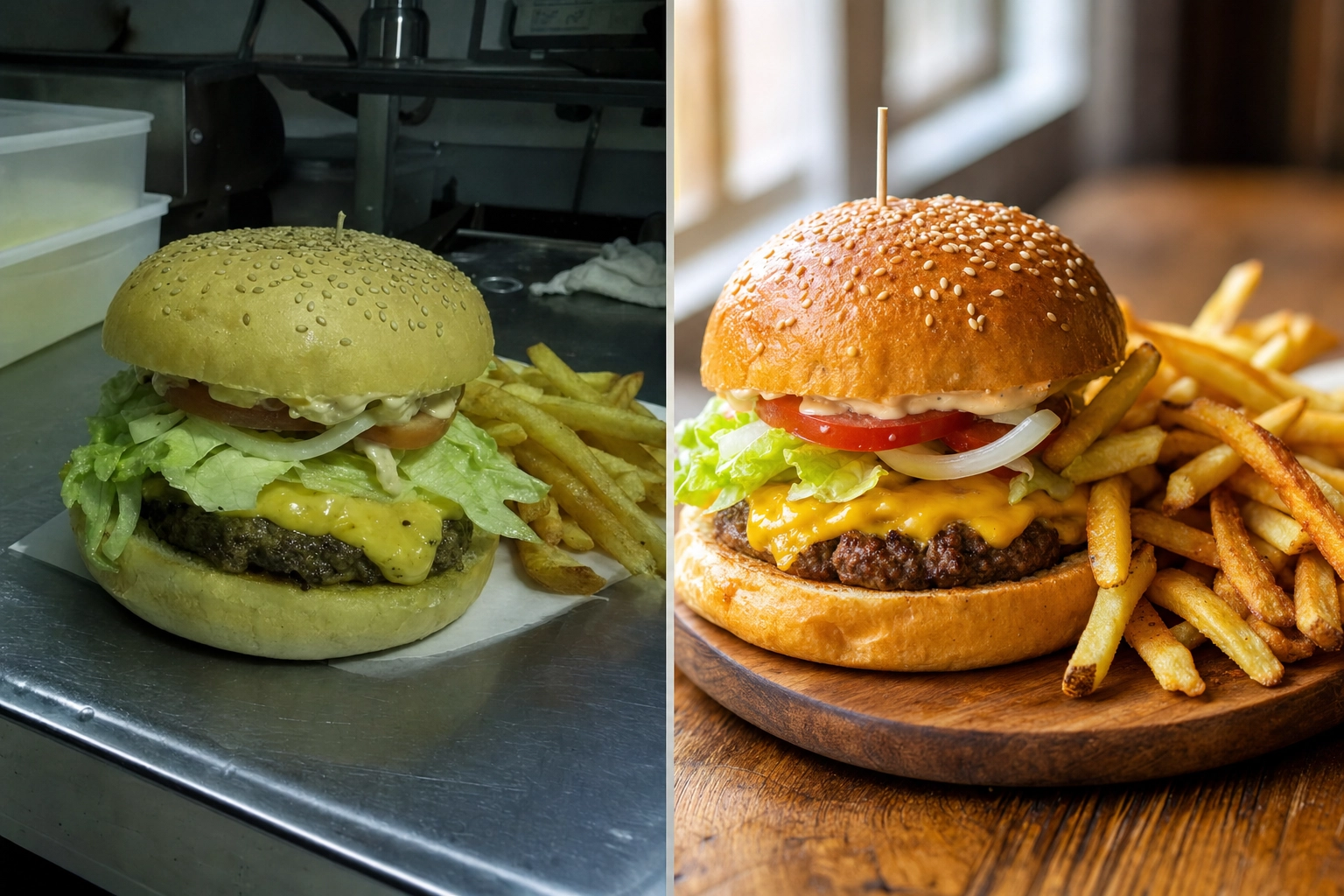
If you are weighing MenuPhotoAI against FoodShot, you are probably a restaurant or food brand owner who wants menu photos that sell — without booking a $600 photo shoot. Both tools take a phone snap of a real dish and turn it into a professional, menu-ready image in minutes. The real question is how far each one lets you go. MenuPhotoAI is a focused delivery-photo enhancer. FoodShot is a full food photography studio with 200+ styles, brand matching, and marketing tools built in. Here is the honest, side-by-side breakdown so you can pick the right tool the first time.
같은 치즈버거 메뉴 사진의 전후 비교, 칙칙한 휴대폰 스냅샷 옆에 놓인 밝고 전문적인 AI 보정 결과
Quick Summary: MenuPhotoAI is a solid, delivery-focused photo enhancer that starts at $39 per month. FoodShot is a broader AI food photography studio — 200+ styles, Builder Mode, brand matching, Poster Mode, and 2K output — starting at $15 per month. Both start from a photo of your real food rather than generating dishes from a text prompt.
MenuPhotoAI vs FoodShot: 간단한 결론
배달 사진 몇 장만 정리하면 되고 알아서 해 주는 옵션을 선호한다면 MenuPhotoAI도 합리적인 선택입니다. 하지만 메뉴 전체에 걸친 일관된 브랜드 룩, 더 넓은 창작 범위, 마케팅 포스터, 그리고 더 낮은 시작 가격의 모바일 앱을 원한다면 FoodShot이 더 강력한 AI 음식 사진 편집기입니다. 두 도구 모두 실제 요리를 가장 먹음직스럽게 보이도록 만들며, 차이는 폭과 제어력, 비용입니다.
MenuPhotoAI가 잘하는 것
인정할 것은 인정합시다. MenuPhotoAI는 하나의 명확한 임무를 중심으로 만들어졌습니다. 레스토랑을 위해 배달 사진이 규정을 지키고 주문 전환으로 이어지게 하는 것입니다. 창업자 Paolo와 Shivani는 유럽에서 수년간 메뉴를 촬영했고, 그 집중된 초점이 기능에 그대로 반영되어 있습니다.
- 배달 플랫폼 최적화. MenuPhotoAI는 Uber Eats, DoorDash, Grubhub, Deliveroo의 요건에 강하게 맞춰져 있습니다. 배달용 스타일은 썸네일이 0.5초 안에 식욕을 자극해야 하는 작은 모바일 화면에 맞게 조정되어 있습니다.
- 엉망인 사진 살리기. 어둡고 흐릿하며 휴대폰 조명으로 찍은 사진이야말로 이 도구가 빛을 발하는 지점입니다. 거친 사진을 올리면 약 30초 만에 더 깨끗하고 밝으며 전문적인 결과를 얻습니다.
- 무료 재편집. 가장 특징적인 기능은 재편집 시스템입니다. 원하는 수정("더 따뜻하게", "대비 추가")을 설명하면 추가 비용 없이 이미지를 조정해 줍니다. 모든 이미지에 무료 재편집이 포함됩니다.
- 스타일 매치 모드. 마음에 들었던 이전 결과물을 고르면 새로 올린 사진에도 같은 룩을 적용해 주어 메뉴의 일관성을 유지하는 데 도움이 됩니다.
- 대행 서비스. 도구를 직접 다루고 싶지 않은 레스토랑을 위해 MenuPhotoAI는 24~48시간 내에 처리되는 이메일 보정 서비스를 제공합니다.
또한 AI 음식 사진이 어떠해야 하는지에 대해 보기 드물게 솔직합니다. 즉, 지어낸 음식이 아니라 실제 요리를 향상시키는 것이라는 관점입니다. 이는 FoodShot도 공유하는 가치이며, 자세한 내용은 아래에서 다룹니다.
FoodShot이 앞서는 지점
MenuPhotoAI는 의도적으로 좁게 설계되었습니다. FoodShot은 동일한 배달 작업을 처리한 뒤에도 계속 나아가며, 이는 메뉴 전체와 웹사이트, 소셜 피드를 스타일링할 때 중요해집니다. 실제로 결과를 바꿔 주는 기능들과 그 기능이 만들어 내는 전문적인 사진을 소개합니다.
각기 다른 분위기와 표면으로 스타일링된 여덟 가지 요리의 그리드로, 200개가 넘는 음식 사진 스타일 라이브러리를 보여 줍니다
수십 개가 아닌 200개 이상의 스타일
가장 뚜렷한 차이는 범위입니다. MenuPhotoAI는 배달용 스타일 약 8개와 제품 사진 스타일 18개, 합쳐서 대략 스물몇 개의 프리셋을 제공합니다. FoodShot은 배달, 메뉴, 파인다이닝 카테고리로 정리된 200개 이상의 엄선된 스타일을 제공합니다. 이 차이는 겉치레가 아닙니다. 버거, 말차 라떼, 플레이팅된 테이스팅 코스, 크루아상 한 쟁반은 각기 다른 조명과 표면, 분위기에서 가장 잘 어울립니다. 스타일이 많을수록 모든 요리를 똑같은 몇 개의 프리셋에 억지로 끼워 맞추는 대신 각 요리에 맞는 하나의 룩을 찾을 가능성이 훨씬 높아집니다. 더 넓은 카테고리가 어떻게 비교되는지 보고 싶다면, 최고의 AI 음식 사진 편집기 정리 글에서 자세히 다룹니다.
빌더 모드: 나만의 사진 구성하기
프리셋은 출발점일 뿐 한계가 아닙니다. FoodShot의 빌더 모드에서는 배경 표면, 접시 스타일, 그리고 음식을 하나의 구성된 이미지로 조합할 수 있습니다. 파스타를 무드 있는 측면 조명 아래 어두운 슬레이트 위에 올리고 싶은가요, 아니면 케이크를 밝고 산뜻한 자연광 속 대리석 카운터 위에 두고 싶은가요? 고정된 프리셋이 얼추 맞기를 바라는 대신 배경과 조명을 직접 설정합니다. MenuPhotoAI는 이런 레이어 방식의 구성을 제공하지 않으며, 제공되는 보정 결과를 받아서 거기서부터 재편집하게 됩니다.
My Styles: 일반 프리셋이 아닌 내 브랜드에 맞추기
이것은 성장하는 브랜드가 가장 중요하게 여기는 기능입니다. My Styles에서는 몇 장의 참고 사진(직접 찍은 최고의 사진이나 따라 하고 싶은 룩)을 올리면 FoodShot이 새로 올리는 모든 사진에 그 스타일을 맞춰 줍니다. 그 결과는 브랜드 일관성입니다. 모든 요리, 모든 플랫폼에서 같은 따뜻함, 같은 배경 언어, 같은 전문적인 느낌을 유지합니다. MenuPhotoAI의 스타일 매치 모드도 과거 결과를 재사용해 비슷한 일을 하지만, My Styles는 단일 이미지를 복제하는 것이 아니라 브랜드 정체성을 고정하도록 특별히 설계되었습니다.
다중 변형과 포스터 모드
한 번의 업로드로 여러 옵션을. FoodShot은 사진 한 장에서 한 요리의 여러 변형을 생성할 수 있어, 다시 촬영하지 않고도 웹사이트나 배달 앱에서 서로 다른 룩을 A/B 테스트할 수 있습니다. 또한 포스터 모드도 포함되어 있는데, 완성된 음식 이미지를 신메뉴, 명절 메뉴, 소셜 캠페인용 홍보 그래픽으로 바꿔 주는 마케팅 템플릿입니다. MenuPhotoAI는 향상된 사진 자체에 집중하며, 마케팅 레이아웃은 사용자의 몫으로 남겨 둡니다.
배달을 넘어: 제품 및 마케팅 사진
포장 식품의 경우 제품 사진은 그 자체로 별개의 과제입니다. MenuPhotoAI는 간단한 제품 촬영을 겨냥한 18개의 제품 사진 스타일을 제공합니다. FoodShot 역시 제품 사진을 다루며(포장, 소매 등록, 웹사이트용 제품 이미지를 촬영하는 CPG 브랜드를 위해) 이러한 제품 기능을 플레이팅된 메뉴 및 파인다이닝 룩과 하나의 라이브러리에 함께 담았습니다. 카탈로그에 소매 제품 사진과 레스토랑 요리가 섞여 있다면, 두 가지를 모두 아우르는 하나의 도구가 제품 사진과 전문적인 메뉴 결과물을 모든 채널에서 일관되게 유지해 줍니다.
매끄러운 그라데이션 배경 위에 놓인 무브랜드 칠리 크리스프 병의 스튜디오 제품 사진으로, CPG 제품 사진을 보여 줍니다
2K Output and a 2× Upscale on Every Paid Plan
Resolution matters the moment you go beyond a delivery thumbnail — printed menus, in-store posters, and hero banners all need real pixels. Every FoodShot paid plan downloads at 2K, and the web studio's 2× upscale gives you a larger file when you need one for print. MenuPhotoAI reserves its Ultra-HD processing for its top tier. If print matters to you, compare the actual file sizes each tool gives you on the plan you would buy.
FoodShot vs MenuPhotoAI: 기능 및 가격 비교
2026년 7월 기준으로 확인한 가격을 담은 정면 비교입니다. 수치는 바뀔 수 있으니 구매 전에 각 사이트를 확인하세요.
| 기능 | FoodShot | MenuPhotoAI |
|---|---|---|
| 시작 가격 | 월 $15 (연간 결제 시 월 $9) | 월 $39 (첫 달 $9.99) |
| 무료 플랜 | None on the web | 테스트 이미지 5장 + 재편집 10회, 워터마크 포함 |
| 스타일 라이브러리 | 200개 이상 스타일 (배달, 메뉴, 파인다이닝) | 약 26개 (배달 8개 + 제품 18개) |
| 빌더 모드 (사진 구성) | 예 | 없음 |
| 브랜드 매칭 | My Styles (참고 사진 업로드) | 스타일 매치 모드 (결과 재사용) |
| 한 번의 업로드로 다중 변형 | 예 | 대신 재편집 제공 |
| 포스터 / 마케팅 템플릿 | 포스터 모드 | 없음 |
| 최대 해상도 | 2K on all paid plans | 최상위 등급에서만 울트라 HD |
| 배달 앱 최적화 | 예 | 예 (핵심 기능) |
| 모바일 앱 | iOS 및 Android | 웹 우선 |
| 대행 서비스 | 없음 | 예 (이메일 보정) |
| API 액세스 | 엔터프라이즈 | 영업팀 문의 |
가격 비교: 실제로 지불하는 금액
The entry point is the headline. FoodShot's Starter plan is $15 per month, or about $9 per month billed yearly, and includes the full 200+ styles library, Builder Mode, Poster Mode, 2K output, and a commercial license. MenuPhotoAI's cheapest paid plan is $39 per month (discounted to $9.99 for the first month), giving you 25 images plus re-edits.
MenuPhotoAI offers a watermarked free tier so you can test before you pay; FoodShot has no free tier on the web, but its paid entry costs less than half as much and unlocks far more styles and features per dollar. If you process photos regularly, compare the real monthly value on the FoodShot pricing page rather than the sticker price alone. For a bigger-picture cost decision, our breakdown of AI vs hiring a food photographer shows why either tool beats a $500-2,000 shoot.
아늑한 독립 카페의 재생 목재 카운터 위에 스타일링된 플랫 화이트와 아몬드 크루아상으로, 합리적인 가격의 전문 음식 사진을 보여 줍니다
솔직한 이야기: 향상 vs 조작
모든 AI 음식 도구를 둘러싸고 도는 합당한 우려가 있습니다. 가짜 음식을 만들어 내는가 하는 것입니다. 이는 사진이 애초에 배달 플랫폼에 허용되는지 여부에 영향을 주기 때문에 솔직하게 답할 가치가 있습니다.
Neither FoodShot nor MenuPhotoAI fabricates dishes. Both start from a photo of the real food you actually serve and improve it — better lighting, cleaner background, sharper texture, a more appetizing crop. FoodShot's approach is restyling: it starts from your burger, not a different one, but a style can change the plate, surface, props and light, so check each result against the real item before you publish it. That matters in practice. DoorDash, Uber Eats and other platforms expect menu images to represent the real item, some platforms, such as Deliveroo, do not accept AI-generated images at all, and photos that misrepresent food can be pulled or hurt customer trust.
Does FoodShot Work for Uber Eats and DoorDash?
Yes, on platforms whose rules allow edited photos. Delivery is a first-class use case, not an afterthought. FoodShot's Delivery style category is built for exactly this — clean, bright, high-contrast images that read instantly at thumbnail size on a crowded delivery app. You can prep the same dish for Uber Eats, DoorDash and Grubhub (Deliveroo does not accept AI-generated images), then reuse those same images on your website and social channels — the same photos working across delivery, web, and print — without another upload. See the dedicated delivery app photos workflow for the full delivery setup, and the food photography for restaurants guide for menu-wide styling. Platform photo standards evolve, so it is worth checking each platform's current merchant guidelines — for example DoorDash's photo requirements and Uber Eats menu photo guidance — before you publish a full menu.
레스토랑 패스 위 크라프트 테이크아웃 용기에 담긴 선명한 연어 포케 볼로, Uber Eats와 DoorDash 배달 썸네일로 돋보이도록 스타일링되었습니다
어느 것을 선택해야 할까요?
무조건 "더 나은" 도구란 없습니다. 눈앞의 작업과 실제로 사용할 기능이 무엇인지에 따라 달라집니다. 두 도구의 기능을 자신의 사진에 맞춰 나란히 놓고 보면 대개 답이 금방 분명해집니다.
이럴 때 MenuPhotoAI를 고르세요...
주로 소수의 배달 사진만 정리하면 되고, 손대지 않아도 되는 이메일 서비스를 중시하며, 재편집 방식이 당신의 작업 스타일에 잘 맞을 때입니다. 배달 규정 준수가 유일한 목표이고 이따금 몇 가지 요리만 업데이트한다면, MenuPhotoAI는 그 일을 잘 해냅니다.
이럴 때 FoodShot을 고르세요...
You want brand consistency across a full menu, more than two dozen styles to choose from, the ability to compose shots in Builder Mode, marketing posters, mobile apps for shooting on the floor, 2K files with a 2× upscale for print, and a lower $15 entry price. For most growing restaurants, cafés, and food brands, that broader toolset earns its keep.
How to Try FoodShot in Three Steps
The simplest way to find out is one month of the Starter plan ($15, cancel anytime), which lets you test it on photos of your own dishes.
- 사진을 올리세요. 라이트박스나 링 라이트 없이도 실제 요리를 평범한 휴대폰으로 찍어 업로드하세요.
- 스타일을 고르거나 빌더 모드를 여세요. 200개 이상의 스타일 중에서 고르거나, 배경 표면과 접시, 조명을 설정해 나만의 장면을 만드세요.
- Download the result. In about 2 minutes you get professional, menu-ready photos, downloaded at 2K with a commercial license on every paid plan.
Run the same dish through both tools and judge the results side by side. Most restaurants find that testing on their own real photos — not polished marketing samples — makes the choice obvious in a few seconds. That head-to-head, on your own food, is the fastest way to know which tool belongs in your workflow.
자주 묻는 질문
FoodShot은 좋은 MenuPhotoAI 대안인가요?
네. FoodShot은 실제 음식 사진을 전문적인 배달용 이미지로 바꾸는 동일한 핵심 작업을 처리하면서, 200개 이상의 스타일, 빌더 모드, 브랜드 매칭, 포스터 모드, 모바일 앱, 그리고 더 낮은 월 $15 시작 가격을 더합니다. 배달 보정 이상을 원하는 사람에게 FoodShot은 강력한 MenuPhotoAI 대안입니다.
MenuPhotoAI와 FoodShot 중 어느 것이 더 저렴한가요?
FoodShot is cheaper to start. Its paid plans begin at $15 per month ($9 per month billed yearly), while MenuPhotoAI's cheapest plan is $39 per month after the first-month discount. MenuPhotoAI has a free, watermarked tier; FoodShot plans start at $15/month.
AI 음식 사진은 가짜 음식을 만들어 내나요?
No — at least not with these tools. Both FoodShot and MenuPhotoAI start from photos of your real dishes rather than generating food from a text prompt. FoodShot restyles the food you actually serve, but a style can change the plate, surface and props, so check each result against the real item and each platform's photo rules before you publish.
FoodShot이 우리 레스토랑의 브랜드 룩에 맞출 수 있나요?
네. My Styles로 참고 사진을 올리면 모든 새 이미지가 브랜드의 조명, 배경, 분위기에 맞춰집니다. 빌더 모드는 사진마다 표면과 접시, 조명을 설정하게 해 제어력을 한층 더해 주어, 메뉴 전체가 한 명의 사진작가가 찍은 것처럼 보이게 합니다.
무료 플랜이나 앱이 있나요?
There is no free plan on the web: FoodShot plans start at $15/month. It does offer native iOS and Android apps so you can shoot, style, and download food photos right from your phone.