 Ali Tanis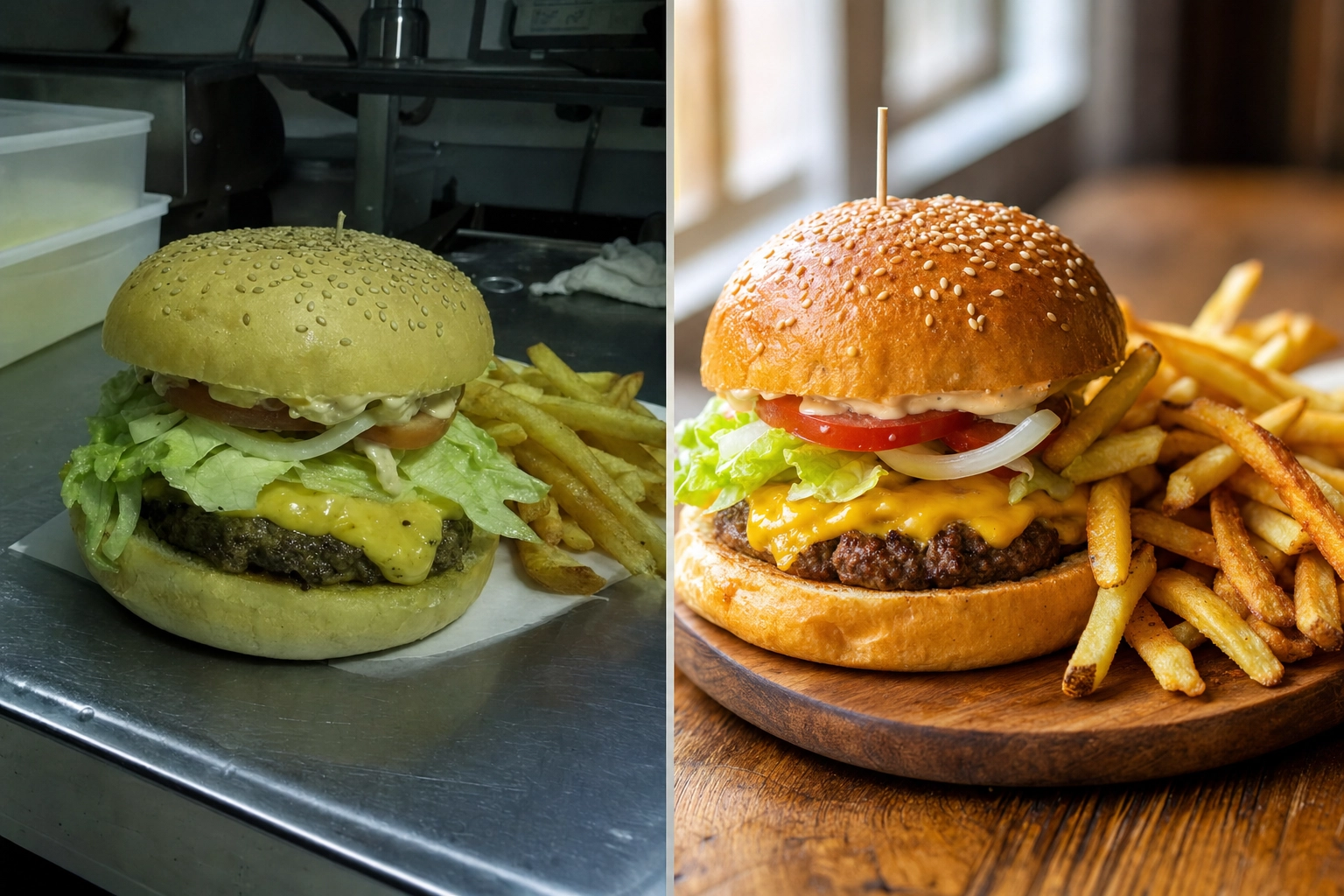
If you are weighing MenuPhotoAI against FoodShot, you are probably a restaurant or food brand owner who wants menu photos that sell — without booking a $600 photo shoot. Both tools take a phone snap of a real dish and turn it into a professional, menu-ready image in minutes. The real question is how far each one lets you go. MenuPhotoAI is a focused delivery-photo enhancer. FoodShot is a full food photography studio with 200+ styles, brand matching, and marketing tools built in. Here is the honest, side-by-side breakdown so you can pick the right tool the first time.
同一張起司漢堡菜單照片的前後對比,一張暗沉的手機隨手拍,旁邊是明亮、專業、經 AI 優化的成果
Quick Summary: MenuPhotoAI is a solid, delivery-focused photo enhancer that starts at $39 per month. FoodShot is a broader AI food photography studio — 200+ styles, Builder Mode, brand matching, Poster Mode, and 2K output — starting at $15 per month. Both start from a photo of your real food rather than generating dishes from a text prompt.
MenuPhotoAI 對比 FoodShot:簡短結論
如果你只需要整理少數幾張外送照片,又偏好全程代勞的方案,MenuPhotoAI 是合理的選擇。但如果你想要整份菜單一致的品牌風格、更大的創意發揮空間、行銷海報,以及入門價更低的行動 App,FoodShot 會是更強的 AI 美食照片編輯器。兩者都是拍下真實餐點並讓它呈現最佳樣貌——差別在於廣度、掌控度與成本。
MenuPhotoAI 做得好的地方
該給的肯定要給。MenuPhotoAI 圍繞著一個明確的任務打造:讓餐廳的外送照片既符合平台規範、又能提升點擊轉換。創辦人 Paolo 與 Shivani 在歐洲拍攝菜單多年,其功能也反映了這份專注。
- 外送平台定位。MenuPhotoAI 全力貼合 Uber Eats、DoorDash、Grubhub 與 Deliveroo 的規範。它的外送風格是為手機小螢幕調校的——在那裡,一張縮圖只有半秒鐘的時間讓人食指大動。
- 拯救糟糕的照片。昏暗、模糊、只靠手機光源的照片,正是它大顯身手之處。上傳一張粗糙的照片,大約 30 秒後你就能得到更乾淨、更明亮、更專業的成果。
- 免費重新編輯。它最具特色的功能是重新編輯系統:只要描述你想微調的方向(「調暖一點」、「增加對比」),它就會免費為你調整影像。每張圖都附帶免費的重新編輯。
- 風格匹配模式。選一張你先前滿意的成果,它就會把同樣的風格套用到新上傳的照片上,有助於維持整份菜單的一致性。
- 全程代勞的服務。對於完全不想自己動手操作的餐廳,MenuPhotoAI 提供以電子郵件寄件的優化服務,作業時間為 24-48 小時。
它對「AI 美食攝影應該是什麼」也抱持著令人耳目一新的誠實態度:優化你真實的餐點,而不是憑空捏造食物。這也是 FoodShot 認同的價值——這一點稍後會再詳談。
FoodShot 領先的地方
MenuPhotoAI 刻意走窄而專的路線。FoodShot 則涵蓋同樣的外送需求,並且繼續往前——當你要為整份菜單、網站與社群動態統一風格時,這一點就格外重要。以下是真正會改變你成果的功能,以及它們所產出的專業照片。
八道不同餐點排成的網格,每一道都以獨特的氛圍與檯面呈現,展示超過 200 種美食攝影風格的資料庫
200+ 風格,而不是區區幾十種
最明顯的差距在於廣度。MenuPhotoAI 大約提供 8 種外送風格,再加上 18 種產品攝影風格——總共約兩打預設。FoodShot 則內建 200+ 精選風格,分門別類涵蓋外送、菜單與高級餐飲三大類別。這個差距並非虛有其表。一個漢堡、一杯抹茶拿鐵、一道擺盤精緻的品嚐套餐,以及一盤可頌,各自適合不同的光線、檯面與氛圍。風格越多,你就越有可能為每一道菜找到最合適的那一種樣貌,而不是硬把所有東西塞進同樣的幾個預設。如果你想了解整個品類的比較,我們整理的 最佳 AI 美食照片編輯器 一文有詳細拆解。
建構模式:自己組合每一張照片
預設只是起點,而非上限。FoodShot 的建構模式讓你把背景檯面、餐盤風格與你的食物組合成一張精心構圖的影像。想讓你的義大利麵放在深色石板上、搭配帶情緒的側光,或是讓蛋糕擺在大理石檯面上、沐浴在明亮通透的日光裡?你可以自己設定背景與光線,而不必寄望某個固定預設剛好夠接近。MenuPhotoAI 並不提供這種分層構圖——你只能就它給你的優化結果,再從那裡重新編輯。
我的風格:貼合你的品牌,而非套用通用預設
這是成長中的品牌最在意的功能。透過我的風格,你上傳幾張參考照片——你自己最滿意的作品,或是你想模仿的樣貌——FoodShot 就會把那套風格套用到之後每一張新上傳的照片。成果就是品牌一致性:每一道菜、每一個平台,都有同樣的溫度、同樣的背景語彙、同樣的專業質感。MenuPhotoAI 的風格匹配模式透過重複使用過往成果達成類似效果,但我的風格是專門為了鎖定品牌識別而打造,而不只是複製單一一張影像。
多重變化與海報模式
上傳一次,多種選擇。FoodShot 能從單一張照片為一道菜產生多種變化,讓你不必重拍就能在網站或外送 App 上 A/B 測試不同樣貌。它還內建海報模式——這些行銷範本能把一張完成的美食影像,變成用於新品特餐、節慶菜單或社群活動的宣傳圖。MenuPhotoAI 專注於優化後的照片本身,行銷排版則留給你自己處理。
不只外送:產品與行銷攝影
對包裝商品而言,產品攝影本身就是一項挑戰。MenuPhotoAI 收錄了 18 種產品攝影風格,鎖定簡單的產品照。FoodShot 同樣能處理產品照——服務為包裝、零售通路上架與網站拍攝產品影像的 CPG 品牌——但它把這些產品功能,與擺盤菜單及高級餐飲的樣貌集中在同一個資料庫裡。如果你的商品目錄同時混合了零售產品照與餐廳菜色,一個兩者兼顧的工具,能讓你的產品攝影與專業菜單成果在每個通路上都保持一致。
無品牌辣椒脆醬玻璃罐的棚拍產品照,襯著無接縫的漸層背景,展示 CPG 產品攝影
2K Output and a 2× Upscale on Every Paid Plan
Resolution matters the moment you go beyond a delivery thumbnail — printed menus, in-store posters, and hero banners all need real pixels. Every FoodShot paid plan downloads at 2K, and the web studio's 2× upscale gives you a larger file when you need one for print. MenuPhotoAI reserves its Ultra-HD processing for its top tier. If print matters to you, compare the actual file sizes each tool gives you on the plan you would buy.
FoodShot 對比 MenuPhotoAI:功能與價格比較
以下是兩者的正面對決,價格已於 2026 年 7 月核實。數字可能變動,購買前請先到各家網站確認。
| 功能 | FoodShot | MenuPhotoAI |
|---|---|---|
| 入門價格 | 每月 $15(年繳約每月 $9) | 每月 $39(首月 $9.99) |
| 免費方案 | None on the web | 5 張測試圖 + 10 次重新編輯,含浮水印 |
| 風格資料庫 | 200+ 風格(外送、菜單、高級餐飲) | 約 26 種(8 種外送 + 18 種產品) |
| 建構模式(組合構圖) | 有 | 否 |
| 品牌匹配 | 我的風格(上傳參考照片) | 風格匹配模式(重複使用先前成果) |
| 單次上傳產生多重變化 | 有 | 改為重新編輯 |
| 海報/行銷範本 | 海報模式 | 否 |
| 最高解析度 | 2K on all paid plans | 僅最高方案提供 Ultra-HD |
| 外送 App 最佳化 | 有 | 有(核心重點) |
| 行動 App | iOS 與 Android | 以網頁為主 |
| 全程代勞服務 | 否 | 有(電子郵件優化服務) |
| API 存取 | 企業方案 | 聯繫業務 |
價格比較:你實際要付多少
The entry point is the headline. FoodShot's Starter plan is $15 per month, or about $9 per month billed yearly, and includes the full 200+ styles library, Builder Mode, Poster Mode, 2K output, and a commercial license. MenuPhotoAI's cheapest paid plan is $39 per month (discounted to $9.99 for the first month), giving you 25 images plus re-edits.
MenuPhotoAI offers a watermarked free tier so you can test before you pay; FoodShot has no free tier on the web, but its paid entry costs less than half as much and unlocks far more styles and features per dollar. If you process photos regularly, compare the real monthly value on the FoodShot pricing page rather than the sticker price alone. For a bigger-picture cost decision, our breakdown of AI vs hiring a food photographer shows why either tool beats a $500-2,000 shoot.
溫馨的獨立咖啡館中,一杯經過造型的 Flat White 咖啡與一個杏仁可頌擺在回收木檯面上,展現平價又專業的美食照片
誠實的部分:優化,而非捏造
圍繞著每一款 AI 美食工具,都有一個合理的疑慮:它會不會做出假的食物?這值得直白地回答,因為它關係到你的照片究竟能不能被外送平台接受。
Neither FoodShot nor MenuPhotoAI fabricates dishes. Both start from a photo of the real food you actually serve and improve it — better lighting, cleaner background, sharper texture, a more appetizing crop. FoodShot's approach is restyling: it starts from your burger, not a different one, but a style can change the plate, surface, props and light, so check each result against the real item before you publish it. That matters in practice. DoorDash, Uber Eats and other platforms expect menu images to represent the real item, some platforms, such as Deliveroo, do not accept AI-generated images at all, and photos that misrepresent food can be pulled or hurt customer trust.
Does FoodShot Work for Uber Eats and DoorDash?
Yes, on platforms whose rules allow edited photos. Delivery is a first-class use case, not an afterthought. FoodShot's Delivery style category is built for exactly this — clean, bright, high-contrast images that read instantly at thumbnail size on a crowded delivery app. You can prep the same dish for Uber Eats, DoorDash and Grubhub (Deliveroo does not accept AI-generated images), then reuse those same images on your website and social channels — the same photos working across delivery, web, and print — without another upload. See the dedicated delivery app photos workflow for the full delivery setup, and the food photography for restaurants guide for menu-wide styling. Platform photo standards evolve, so it is worth checking each platform's current merchant guidelines — for example DoorDash's photo requirements and Uber Eats menu photo guidance — before you publish a full menu.
一碗色彩鮮明的鮭魚 poke 碗裝在牛皮紙外帶盒中、擺在餐廳出餐檯上,經過造型讓它能在 Uber Eats 與 DoorDash 的外送縮圖中格外亮眼
你該選哪一個?
沒有哪一款工具是絕對「比較好」的——關鍵在於你眼前要完成的任務,以及你真正會用到哪些功能。把兩者的功能清單對照你自己的照片,答案通常很快就會浮現。
在這些情況選 MenuPhotoAI……
你主要只需要整理一小批外送照片、看重完全不必動手的電子郵件服務,而重新編輯的流程也符合你的工作習慣。如果符合外送規範是你唯一的目標,且你只是偶爾更新少數幾道菜,它能把這件事做得很好。
在這些情況選 FoodShot……
You want brand consistency across a full menu, more than two dozen styles to choose from, the ability to compose shots in Builder Mode, marketing posters, mobile apps for shooting on the floor, 2K files with a 2× upscale for print, and a lower $15 entry price. For most growing restaurants, cafés, and food brands, that broader toolset earns its keep.
How to Try FoodShot in Three Steps
The simplest way to find out is one month of the Starter plan ($15, cancel anytime), which lets you test it on photos of your own dishes.
- 上傳一張照片。用手機為一道真實的餐點拍一張普通照片——不需要攝影燈箱或環形補光燈——然後上傳。
- 挑一個風格,或打開建構模式。從 200+ 風格中選擇,或自行設定背景檯面、餐盤與光線,打造屬於你的場景。
- Download the result. In about 2 minutes you get professional, menu-ready photos, downloaded at 2K with a commercial license on every paid plan.
Run the same dish through both tools and judge the results side by side. Most restaurants find that testing on their own real photos — not polished marketing samples — makes the choice obvious in a few seconds. That head-to-head, on your own food, is the fastest way to know which tool belongs in your workflow.
常見問題
FoodShot 是好的 MenuPhotoAI 替代方案嗎?
是的。FoodShot 涵蓋同樣的核心任務——把真實的美食照片變成專業、可直接用於外送的影像——同時再加上 200+ 風格、建構模式、品牌匹配、海報模式、行動 App,以及更低的 $15 入門價。對於任何需要「不只是外送優化」的人來說,它是一個強而有力的 MenuPhotoAI 替代方案。
MenuPhotoAI 和 FoodShot 哪個比較便宜?
FoodShot is cheaper to start. Its paid plans begin at $15 per month ($9 per month billed yearly), while MenuPhotoAI's cheapest plan is $39 per month after the first-month discount. MenuPhotoAI has a free, watermarked tier; FoodShot plans start at $15/month.
AI 美食攝影會製造假食物嗎?
No — at least not with these tools. Both FoodShot and MenuPhotoAI start from photos of your real dishes rather than generating food from a text prompt. FoodShot restyles the food you actually serve, but a style can change the plate, surface and props, so check each result against the real item and each platform's photo rules before you publish.
FoodShot 能貼合我餐廳的品牌風格嗎?
可以。我的風格讓你上傳參考照片,使每一張新影像都貼合你品牌的光線、背景與氛圍。建構模式則提供更多掌控,讓你為每一張照片個別設定檯面、餐盤與光線——讓你的整份菜單看起來就像出自同一位攝影師之手。
有免費方案或 App 嗎?
There is no free plan on the web: FoodShot plans start at $15/month. It does offer native iOS and Android apps so you can shoot, style, and download food photos right from your phone.